NordVPN ay isa sa mga pinaka-kilalang names sa VPN industry – at may magandang dahilan. Itinayo noong 2012 at headquartered sa Panama (outside ng 14 Eyes surveillance alliance), nakabuo ito ng reputasyon para sa pagsasama ng mabilis na speeds, malakas na security, at malaking server network sa isang polished at user-friendly package.
Pero ito ay hindi ang tipical na NordVPN review. Sa BestProxyFinder, sinusuri namin ang VPN services mula sa pananaw ng proxy users – mga tao na kailangan ng reliable IP rotation, SOCKS5 connections, dedicated IPs, at kakayahang lampasan ang sophisticated anti-bot systems. Kaya ang tanong ay hindi lang "Is NordVPN good?" – kundi "Is NordVPN good para sa proxy-adjacent use cases?"
Ano ang NordVPN?
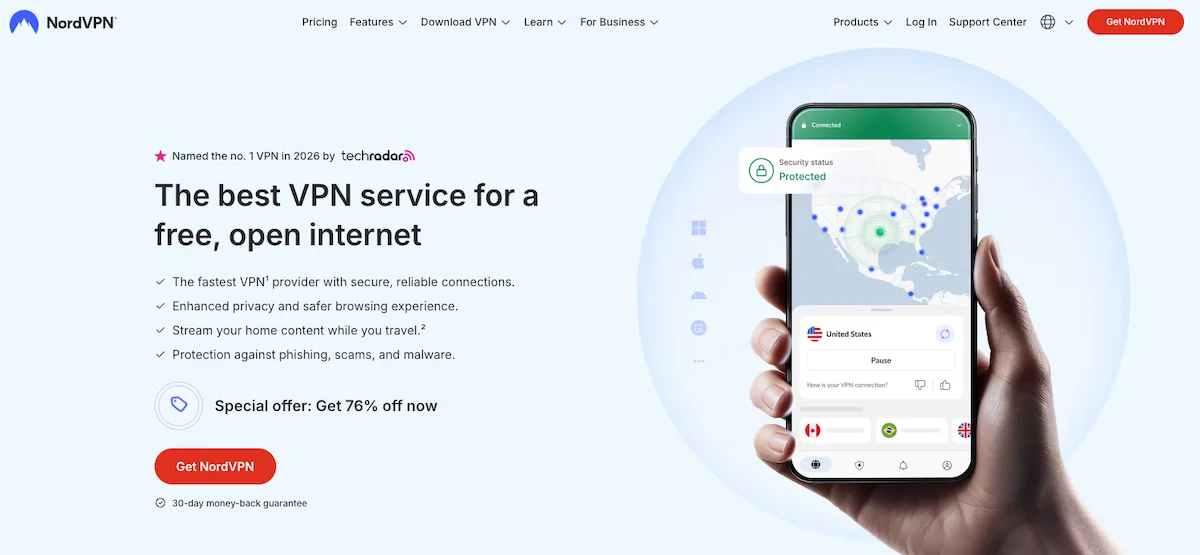
NordVPN ay isang virtual private network service na ino-operate ng Nord Security, isang cybersecurity company na headquartered sa Panama. Inilunsad noong 2012, naging isa itong sa pinakamalaking consumer VPN providers sa mundo, nagsisilbi sa milyun-milyong users globally.
Ang service ay nag-encrypt ng iyong internet traffic at ine-route ito through isa sa 7,000+ servers na spread sa 118 countries, ini-hide ang iyong real IP address at pinoprotektahan ang iyong data mula sa snooping. NordVPN ay gumagamit ng AES-256 encryption – ang parehong standard na ginagamit ng governments at intelligence agencies – at sinusuportahan ang multiple protocols kasama ang proprietary NordLynx (built on WireGuard), OpenVPN, at IKEv2/IPSec.
Ang nagpapasaya sa NordVPN para sa BestProxyFinder audience ay ang built-in proxy functionality. Bawat NordVPN subscription ay may access sa SOCKS5 proxy servers, at ang Chrome/Firefox browser extensions ay gumagana bilang encrypted proxies – meaning maaari mong gamitin ang NordVPN sa paraan na lampas sa traditional VPN tunnel.
NordVPN Speed at Performance (Tested on NordLynx)
Ang speed ay madalas na ang make-or-break factor para sa VPN users, at NordVPN ay nag-deliver ng exceptional performance dahil sa NordLynx protocol. Built on WireGuard framework, nag-add ang NordLynx ng custom double NAT system na nalulutas ang privacy limitations ng WireGuard habang pinapanatili ang blazing-fast speeds.
Sa aming testing, consistently nag-rank ang NordVPN sa mga fastest VPNs available. Ang connection sa nearby servers ay nagpakita ng minimal speed loss – typically under 5-8% reduction mula sa base speeds. Kahit long-distance connections (US to Europe, Europe to Asia) ay nag-maintain ng highly usable speeds para sa streaming, gaming, at large file transfers.
Nandito ang summary ng aming speed test results sa 500 Mbps base connection:
| Server Location | Download Speed | Upload Speed | Ping |
|---|---|---|---|
| US (New York) | 462 Mbps | 198 Mbps | 11 ms |
| UK (London) | 438 Mbps | 176 Mbps | 38 ms |
| Germany (Frankfurt) | 421 Mbps | 162 Mbps | 45 ms |
| Japan (Tokyo) | 312 Mbps | 98 Mbps | 165 ms |
| Australia (Sydney) | 287 Mbps | 84 Mbps | 192 ms |
Ang mga speeds na ito ay naglalagay sa NordVPN comfortably sa top tier ng VPN providers. Ang efficiency ng NordLynx protocol ay nangangahulugan na ang connection times ay near-instant – typically under 2 seconds – at ang speeds ay nananatiling consistent kahit during peak usage hours.
Para sa proxy-oriented users, ang SOCKS5 servers ay nagpakita rin ng strong performance dahil lumalampas sila sa encryption overhead, nag-deliver ng speeds very close sa iyong base connection.
NordVPN vs. Proxies: Alin ang Dapat Gamitin?
Ito ang tanong na pinaka-importante sa aming readers. NordVPN at dedicated proxy services ay may overlapping pero distinct purposes. Nandito kung paano sila nag-compare.
NordVPN Dedicated IPs vs. Datacenter Proxies
Nag-aalok ang NordVPN ng dedicated IP addresses bilang add-on – makakakuha ka ng static IP na gamitin lang mo, available sa US, UK, Germany, France, at Netherlands. Ito ay useful para sa pag-access ng services na nag-whitelist ng specific IPs, pag-maintain ng consistent online identity, o pag-iwas sa CAPTCHAs na nag-trigger kapag nag-change ang iyong IP.
Ngunit ang dedicated IPs ng NordVPN ay recognizable bilang VPN/datacenter IPs ng sophisticated detection systems. Kung kailangan mo ng IPs na mukhang residential addresses – halimbawa, para sa pag-access ng sneaker sites, pag-manage ng social media accounts, o ad verification – kailangan mo pa rin ng dedicated residential proxy providers tulad ng IPRoyal o MarsProxies.
Kayang-kaya ng NordVPN Palitan ang Residential Proxies para sa Scraping?
Sa madaling salita: hindi sa large scale. Binibigyan ka ng NordVPN ng access sa thousands ng IP addresses sa 118 countries, pero hindi ka maaaring mag-rotate through them programmatically ang paraan mo sa rotating residential proxy pool. Walang API para sa IP rotation, walang session control, at ang connection process ay designed para sa human use kaysa automation.
Sinabi, ang SOCKS5 proxy ng NordVPN ay maaaring maging useful para sa lightweight scraping tasks, small-scale data collection, at pag-access ng geo-restricted content mula sa specific countries. Para sa anything na nangangailangan ng thousands ng requests o sophisticated anti-detection, ang dedicated proxy providers ay nananatiling best choice. Tingnan ang aming guides sa residential proxies at datacenter proxies para sa heavy-duty scraping needs.
Deep Dive sa NordVPN Proxy Features
Paano i-Configure ang NordVPN SOCKS5 Proxy
Bawat NordVPN subscription ay may access sa SOCKS5 proxy servers – isang feature na maraming users ang nawawala. SOCKS5 proxies ay nag-route ng iyong traffic through proxy server nang walang encryption, meaning faster speeds sa gastos ng privacy. Ginagawa nitong ideal para sa use cases kung saan ang speed ay mas importante kaysa encryption, tulad ng torrenting o pag-run ng certain automation tools.
Para gamitin ang SOCKS5 proxy ng NordVPN, kailangan mong i-configure ito manually sa iyong application (browser, torrent client, o bot). Nag-provide ang NordVPN ng server addresses at iyong service credentials through dashboard. Ang proxy ay sumusuporta sa TCP at UDP traffic, at maaari kang pumili mula sa servers sa multiple countries.
Key SOCKS5 details:
- Protocol: SOCKS5 (walang encryption – gamitin kasama ang VPN para sa privacy)
- Authentication: Username/password mula sa NordVPN dashboard
- Ports: Configurable per application
- Locations: Multiple countries available
Ang Chrome/Firefox Extension (Encrypted Proxy)
Ang browser extensions ng NordVPN para sa Chrome at Firefox ay karapat-dapat ng special attention. Hindi katulad ng full VPN app na nag-tunnel ng lahat ng device traffic, ang browser extension ay gumagana bilang lightweight encrypted proxy na nag-route lang ng browser traffic. Ginagawa nito na mas mabilis mag-connect, lighter sa system resources, at useful kapag kailangan mo lang protektahan ang iyong browsing activity.
Ang extensions ay sumusuporta sa split tunneling sa browser level – maaari kang pumili kung aling websites ang dadaan sa proxy at alin ang hindi. May kasamang CyberSec (ad/malware blocking) at WebRTC leak prevention. Para sa users na kailangan ng quick IP switching para sa browser-based tasks, ang extension ay truly useful.
Quicklist: Pros at Cons
Positibo
- Malaking server network – 7,000+ servers sa 118 countries
- NordLynx protocol ay nag-deliver ng top-tier speeds
- SOCKS5 proxy included – great para sa torrenting at bots
- Dedicated IP option para sa consistent identity
- Double VPN para sa extra encryption layers
- Obfuscated servers ay lumalampas sa VPN detection at firewalls
- PwC-audited no-logs policy
- Panama jurisdiction – outside surveillance alliances
- Threat Protection Pro ay nagsasara ng malware, trackers, at ads
- Hanggang 10 simultaneous device connections
- 30-day money-back guarantee
- Chrome/Firefox extensions ay gumagana bilang encrypted proxies
- Meshnet para sa private file sharing at remote access
- 24/7 live chat support
Negatibo
- Dedicated IPs ay may extra add-on cost
- SOCKS5 proxy traffic ay hindi encrypted (by design)
- Hindi maaaring i-replace ang rotating residential proxies para sa large-scale scraping
- Short-term monthly pricing ay mahal
- Walang SOCKS5 rotation – single static IP per server
Standout Features para sa Advanced Users
Pag-bypass ng Firewalls gamit ang Obfuscated Servers
Ang obfuscated servers ng NordVPN ay nag-disguise ng VPN traffic para mukhang regular HTTPS traffic. Ito ay critical para sa users sa countries na may heavy internet censorship (China, Russia, Iran, UAE) o sa restricted networks tulad ng corporate Wi-Fi o university networks na actively nag-block ng VPN protocols.
Sa aming testing, successfully naglampas ang obfuscated servers sa deep packet inspection (DPI) sa multiple test networks. Ang connection speeds ay mas mabagal kaysa standard NordLynx connections (expected, given ang extra processing), pero still usable para sa browsing, streaming, at communication.
Pag-route ng Traffic Safely gamit ang Double VPN
Double VPN (multi-hop) ay nag-route ng iyong traffic through dalawang separate VPN servers, nag-encrypt nito twice. Ang iyong traffic ay pumapunta mula sa iyong device → Server A (encrypted) → Server B (encrypted again) → destination. Ito ay nangangahulugan na kahit na ma-compromise ang isang server, ang iyong traffic ay nananatiling protected.
Available Double VPN routes ay may kasamang combinations tulad ng US → Canada, UK → Netherlands, at iba pang marami. Habang ang feature na ito ay nag-add ng latency (typically 20-40% slower kaysa single-hop connections), nag-provide ito ng extra layer ng security na privacy-conscious users ay mag-appreciate.
Meshnet
Meshnet ay isa sa mas innovative features ng NordVPN. Lumilikha ito ng private encrypted network sa pagitan ng iyong devices (at optionally, ng devices ng ibang tao), allowing direct device-to-device connections. Kasama sa use cases ang remote access sa iyong home computer, private file sharing, LAN gaming kasama ang friends across globe, at pag-route ng iyong traffic through trusted device sa ibang location.
Threat Protection Pro
Available sa Plus plans at above, ang Threat Protection Pro ay lumalampas sa basic VPN functionality. Nag-scan ito ng downloads para sa malware, nag-block ng trackers across browsers, at nag-remove ng intrusive ads – kahit hindi ka connected sa VPN server. Isipin itong lightweight security suite bundled kasama ang iyong VPN subscription.
Presyo ng NordVPN
Gumagamit ang NordVPN ng tiered pricing structure sa four plans, may biggest savings sa 2-year commitments. Nandito ang full breakdown:
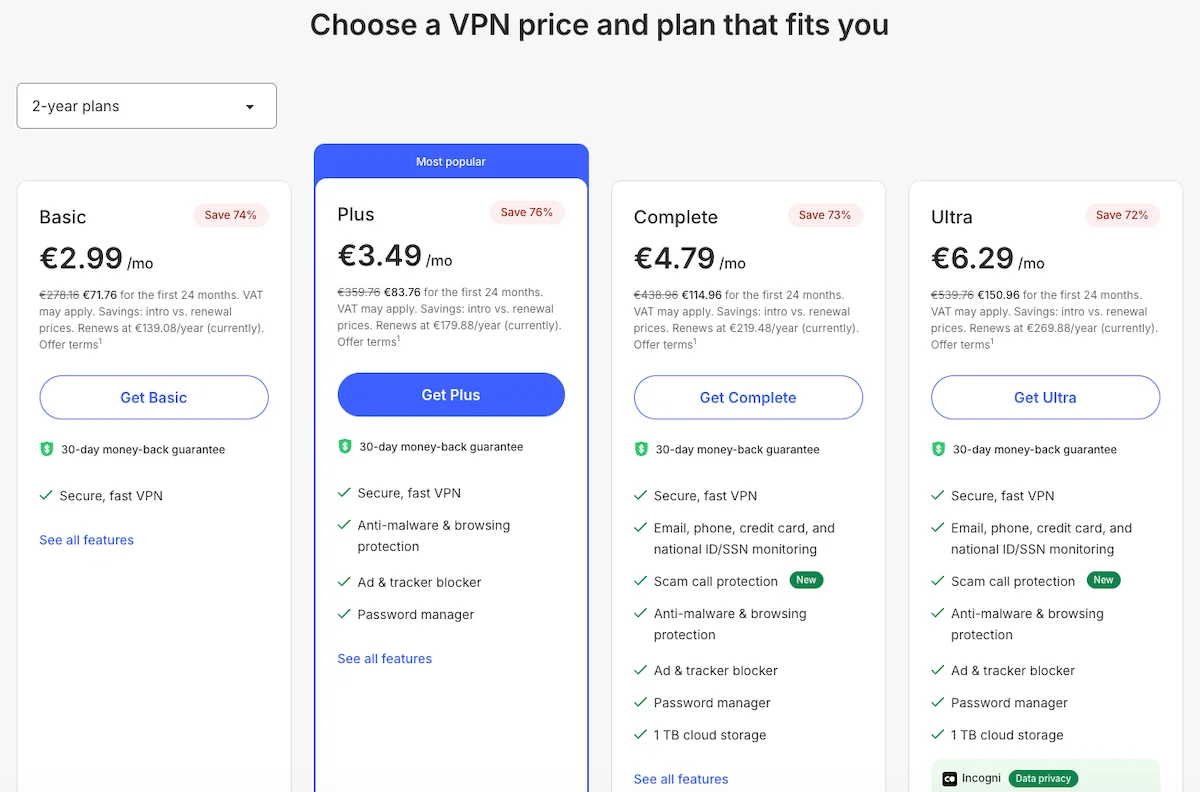
| Plan | Monthly Price (2-Year) | What's Included | Savings |
|---|---|---|---|
| Basic | €2.99/mo | VPN, SOCKS5 proxy, Threat Protection (lite) | 74% |
| Plus | €3.49/mo | Basic + Threat Protection Pro, password manager | 76% |
| Complete | €4.79/mo | Plus + 1TB encrypted cloud storage | 73% |
| Ultra | €6.29/mo | Complete + Incogni data removal | 72% |
Dedicated IP add-on: Available para sa additional monthly fee on top ng any plan. Currently offered sa US, UK, Germany, France, at Netherlands.
Lahat ng plans ay may kasamang 30-day money-back guarantee. Tumatanggap ang NordVPN ng credit cards, PayPal, Google Pay, Amazon Pay, at various cryptocurrencies. VAT ay maaaring mag-apply depende sa iyong location.
Para sa karamihan ng users, ang Plus plan sa €3.49/mo (2-year commitment) ay tumatama sa sweet spot – makakakuha ka ng full VPN kasama ang SOCKS5 proxy, Threat Protection Pro, at password manager. Okay lang ang Basic plan kung kailangan mo lang ng VPN + proxy functionality nang walang extras.
Compared sa dedicated proxy services, ang pricing ng NordVPN ay extremely competitive kung moderate ang iyong needs. Isang basic residential proxy subscription ay typically nagsisimula sa $15-30/month, habang binibigyan ka ng NordVPN ng VPN + SOCKS5 proxy + security features mula €2.99/mo. Ang trade-off, tulad ng napag-usapan sa itaas, ay hindi kayang ang NordVPN mag-match ng IP diversity at rotation capabilities ng dedicated proxy providers.
Suporta sa Customer
Nag-provide ang NordVPN ng 24/7 customer support through live chat at email. Sa aming experience, ang live chat ay responsive – typically nakatanggap kami ng helpful answers sa loob ng 2-3 minutes. Ang support agents ay knowledgeable tungkol sa VPN at proxy configuration, na isa pang plus para sa aming audience.
Ang self-service resources ay excellent. Nag-maintain ang NordVPN ng extensive knowledge base kasama ang detailed setup guides para sa bawat platform, troubleshooting articles, at FAQ sections. May specific guides para sa pag-configure ng SOCKS5 proxies sa popular torrent clients, browsers, at automation tools.
Nag-offer din ng email support para sa mas complex issues, na may typical response times na 24-48 hours. Habang hindi available ang phone support, ang combination ng 24/7 live chat at comprehensive documentation ay effectively nakakover ng karamihan ng support needs.
Final Verdict: Sulit ba ang NordVPN sa 2026?
Nakakuha ng NordVPN ng position bilang isa sa top VPN services para sa isang dahilan. Ang combination ng NordLynx speeds, 7,000+ servers sa 118 countries, at truly privacy-respecting Panama jurisdiction ay gumagawa nito ng strong all-around choice.
Para sa BestProxyFinder readers specifically, ang NordVPN ay nag-occupy ng interesting middle ground. Hindi ito replacement para sa dedicated proxy services – hindi ka mag-run ng large-scale scraping operations o mag-manage ng hundreds ng social media accounts through NordVPN. Pero para sa users na kailangan ng solid IP masking, SOCKS5 proxy access, dedicated IPs, at kakayahang mag-bypass ng geo-restrictions at firewalls, nag-deliver ang NordVPN ng excellent value.
Ang SOCKS5 proxy inclusion lang ay nag-set apart sa NordVPN mula sa maraming competitors. Ang browser extensions na gumagana bilang encrypted proxies ay nag-add ng another layer ng flexibility. At features tulad ng obfuscated servers, Double VPN, at Meshnet ay nag-provide sa advanced users ng tools na simply hindi nag-offer ang karamihan ng VPN providers.
Sa €2.99/mo sa 2-year Basic plan, mahirap mag-argue laban sa value. Kung kailangan mo ng mas marami kaysa nag-offer ang NordVPN sa terms ng IP rotation at residential IPs, i-pair ito kasama ang dedicated proxy provider mula sa aming proxy provider reviews – ang NordVPN ay nag-handle ng iyong general privacy at security, habang ang specialized proxy service ay nag-handle ng iyong data operations.
Bottom line: NordVPN ay excellent VPN na may genuine proxy utility. Sulit ito sa bawat piso para sa privacy-conscious users, at solid companion tool para sa sinumang tao sa proxy space.
NordVPN Alternatibo
Naghahanap ng ibang opsyon? Narito ang mga top-rated na proxy provider:

Mga Madalas na Tanong
Pangkalahatang Marka
Eksperto
9.2User
9PROS
- Malaking server network – 7,000+ servers sa 118 countries
- NordLynx protocol ay nag-deliver ng top-tier speeds
- SOCKS5 proxy included – great para sa torrenting at bots
- Dedicated IP option para sa consistent identity
- Double VPN para sa extra encryption layers
- Obfuscated servers ay lumalampas sa VPN detection at firewalls
- PwC-audited no-logs policy
- Panama jurisdiction – outside surveillance alliances
- Threat Protection Pro ay nagsasara ng malware, trackers, at ads
- Hanggang 10 simultaneous device connections
- 30-day money-back guarantee
- Chrome/Firefox extensions ay gumagana bilang encrypted proxies
- Meshnet para sa private file sharing at remote access
- 24/7 live chat support
CONS
- Dedicated IPs ay may extra add-on cost
- SOCKS5 proxy traffic ay hindi encrypted (by design)
- Hindi maaaring i-replace ang rotating residential proxies para sa large-scale scraping
- Short-term monthly pricing ay mahal
- Walang SOCKS5 rotation – single static IP per server
Mga Review ng User
Batay sa 3 user review
Been using NordVPN for 3 years now and it keeps getting better. The NordLynx speeds are insane — barely notice any slowdown. I use the SOCKS5 proxy for torrenting and the browser extension for quick IP changes when browsing. The dedicated IP add-on is great for accessing my bank without triggering fraud alerts. Only downside is the price went up slightly at renewal, but still worth it.
Switched from ExpressVPN to NordVPN mostly for the SOCKS5 proxy feature. I run a few automation tools that need proxy connections and NordVPN handles it well for my scale. The obfuscated servers are a lifesaver when I travel to the Middle East for work — they consistently get through where other VPNs fail. Support is responsive and actually helpful.
Solid VPN for the price. I mainly use it for privacy and streaming — works with Netflix US, UK, and Japan without issues. The Threat Protection Pro catches a surprising amount of trackers and sketchy downloads. My only complaint is that the SOCKS5 proxy gives you a single IP per server location, so if that IP gets blocked somewhere you're stuck. For serious proxy needs I still use a separate residential proxy service, but for everyday VPN use NordVPN is hard to beat.
Talaan ng Nilalaman