
WhatsApp mass marketing is a high-reward, high-risk game in 2026. With over two billion monthly active users, the platform is the single most valuable channel for businesses that need to reach customers where they actually spend their time. But WhatsApp has also become one of the most aggressive platforms when it comes to banning accounts that violate its policies — and the enforcement mechanisms have gotten significantly more sophisticated over the past year.
If you are running WhatsApp marketing at scale — whether through the official Business API or third-party automation tools — understanding how the platform detects and restricts accounts is no longer optional. The rules changed substantially in late 2025, and most guides online still reference outdated tier structures and policies that no longer apply.
This guide covers everything you need to know: the new messaging limits, the quality rating system, how WhatsApp detects suspicious activity, and how to build infrastructure that keeps your accounts safe using residential proxies and VPNs.
WhatsApp's New Messaging Rules: What Changed in 2025-2026
Meta overhauled WhatsApp's Business Platform messaging limits in October 2025, and the changes are significant enough that any mass marketing operation needs to understand them.
Portfolio-Based Messaging Limits
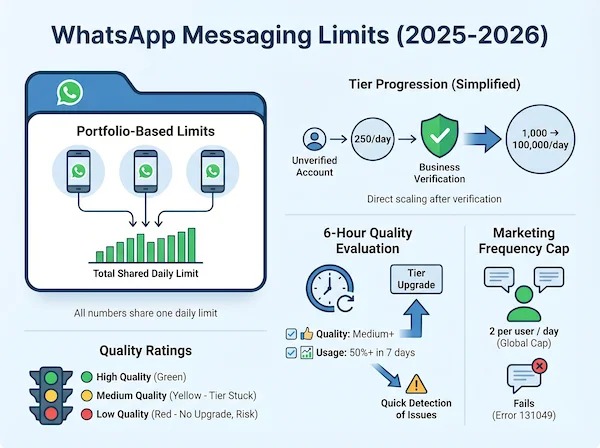
The biggest structural change is that messaging limits now apply per Business Portfolio (formerly called Business Manager), not per individual phone number. This means all phone numbers registered under the same Business Portfolio share a single messaging limit. If you have five numbers under one portfolio, they collectively share the same daily cap — you cannot spread load across numbers within the same portfolio to circumvent limits.
The old tiered progression (1,000 → 10,000 → 100,000 unique contacts per 24 hours) has been simplified. Meta removed the intermediate 2,000 and 10,000 tiers entirely. The current structure works like this:
Unverified business accounts start with a limit of 250 unique contacts per 24-hour period. After completing Business Verification through Meta, the limit increases to 1,000 unique contacts per day. From there, verified accounts can scale directly to 100,000 unique contacts per day — the old intermediate steps have been eliminated.
This simplification is a double-edged sword. On one hand, scaling up is faster for legitimate businesses that maintain good standing. On the other hand, the portfolio-level enforcement means you cannot isolate risk across numbers the way you could before.
The 6-Hour Quality Evaluation Cycle
This is one of the most important — and least discussed — aspects of WhatsApp's enforcement system. Meta evaluates your account quality every 6 hours to determine whether your messaging tier should be upgraded. Two conditions must both be met for an upgrade to occur: your quality rating must be Medium or higher, and you must have used at least 50% of your current messaging limit within the past 7 days.
This 6-hour cycle means tier upgrades can happen multiple times per week for accounts that are actively sending and maintaining good quality scores. But it also means that a sudden spike in user reports or blocks can be detected and acted on within hours, not days. The system is far more responsive than many marketers realize.
Marketing Message Frequency Caps
Starting in October 2025, Meta enforced a hard cap of 2 marketing message templates per user per 24-hour period. This is a global cap — not 2 per business, but 2 total from all businesses combined. If a user has already received 2 marketing messages from other businesses that day, your message will fail with error code 131049.
This has massive implications for mass marketing. Your delivery rates are no longer just a function of your own sending behavior — they depend on how many other businesses are also messaging your target audience. Utility messages and messages within existing conversation windows are not subject to this cap, which is why smart marketers are shifting toward conversational engagement rather than blast-style campaigns.
Quality Ratings: Green, Yellow, Red
WhatsApp assigns a quality rating to every message template and to your overall account based on user feedback collected over a rolling 7-day window. The ratings are straightforward: Green (high quality — low block and report rates), Yellow (medium quality — moderate negative feedback), and Red (low quality — high block and report rates).
A Red rating no longer triggers an automatic tier downgrade as it did previously. However, it completely prevents upward tier movement. You will be stuck at your current messaging limit until quality improves back to Medium or higher. Repeated Red ratings can lead to messaging restrictions or account suspension.
How WhatsApp Detects and Bans Accounts
WhatsApp's anti-spam systems operate on multiple layers, and understanding each one is critical for building infrastructure that avoids triggering them.
Behavioral Analysis
WhatsApp monitors message velocity, content patterns, and interaction metrics in real time. Sending identical or near-identical messages to large numbers of recipients in a short window is the most common trigger for automated restrictions. The system also tracks response rates — if you are sending hundreds of messages and receiving very few replies, that pattern is flagged as likely spam.
Phone Number Verification
WhatsApp requires SMS or voice call verification for every number. The platform has become increasingly effective at detecting virtual phone numbers (VoIP) and numbers from services commonly used for disposable accounts. Numbers from legitimate mobile carriers with a history of normal usage carry significantly higher trust scores than freshly activated or virtual numbers.
Device and IP Fingerprinting
This is where infrastructure matters most. WhatsApp tracks device identifiers, operating system signatures, and — critically — the IP addresses used to connect. When multiple accounts connect from the same IP address, or when a single account's IP changes rapidly between geographically distant locations, the system flags these patterns as suspicious.
Datacenter IP addresses are particularly problematic. WhatsApp, like most major platforms, maintains databases of known datacenter, VPN, and proxy IP ranges. Connections from these IP types start with a significantly lower trust score. If you are managing multiple WhatsApp accounts from a server or cloud instance, the datacenter IP alone can be enough to trigger restrictions.
Unofficial Client Detection
Using modified WhatsApp clients (like WhatsApp Plus, GBWhatsApp, or similar unofficial apps) or automation tools that do not go through the official Business API is a direct violation of WhatsApp's Terms of Service. The platform actively detects connections from unofficial clients through protocol fingerprinting and can permanently ban accounts that use them — sometimes without warning.
Why Residential Proxies Matter for WhatsApp
If you are managing multiple WhatsApp Business accounts — whether for different clients, different campaigns, or different regional operations — you need IP infrastructure that does not raise flags. This is where residential proxies become essential.
The IP Trust Problem
When you operate multiple accounts from a single office or server, all those accounts share the same public IP address. WhatsApp's systems see multiple accounts originating from one location, which is a strong signal that the accounts are related and potentially part of a coordinated marketing operation. Even if each account is legitimate and compliant, the shared IP creates guilt by association — if one account gets flagged, the IP reputation drops for all accounts using it.
Residential proxies solve this by routing each account's traffic through a unique IP address assigned by a real Internet Service Provider to a real household. These IPs carry high trust scores because they are indistinguishable from a normal person using WhatsApp from their home or office. Anti-spam systems cannot easily flag residential IPs without risking false positives on legitimate users.
Mobile Proxies: The Premium Option
Mobile proxies route traffic through real 4G/5G cellular networks. They carry the highest trust scores of any proxy type because mobile carriers use Carrier-Grade NAT (CGNAT), which means thousands of real users share the same public IP address simultaneously. WhatsApp's systems are extremely reluctant to block mobile IP ranges because doing so would affect massive numbers of legitimate users.
For WhatsApp specifically, mobile proxies have an additional advantage: WhatsApp was designed as a mobile-first platform. Traffic originating from a mobile carrier IP looks completely natural — it is exactly what the platform expects to see. A connection from a T-Mobile or Vodafone IP raises zero suspicion, while a connection from an AWS or Hetzner datacenter IP immediately looks anomalous.
Sticky Sessions vs. Rotating IPs for WhatsApp
Sticky sessions are essential for WhatsApp account management. Each account should maintain the same IP address for extended periods — ideally 24 hours or more. WhatsApp tracks session continuity, and an IP change mid-session can invalidate your authentication, trigger re-verification, or flag the activity as suspicious. When managing WhatsApp accounts, always use sticky sessions with a dedicated IP per account.
Rotating IPs are not recommended for WhatsApp account management. Unlike web scraping where frequent IP rotation helps distribute load, WhatsApp expects consistent connection patterns from each account. Save rotating proxies for other use cases.
Building a Compliant WhatsApp Marketing Stack
The safest approach to WhatsApp mass marketing combines official tools with proper infrastructure. Here is a practical architecture that maximizes reach while minimizing ban risk.
1. Use the Official WhatsApp Business API
This is non-negotiable for any serious operation. The official WhatsApp Business API (available through Meta's Cloud API or approved Business Solution Providers) is the only way to send marketing messages at scale without violating WhatsApp's Terms of Service. Unofficial tools and modified clients put your accounts at immediate risk of permanent bans.
The Business API provides template-based messaging, delivery receipts, webhook integrations, and — importantly — operates within the framework of WhatsApp's quality monitoring system. Your messages go through proper channels, and your quality ratings are tracked transparently.
2. Obtain Explicit Opt-In Consent
Every recipient must have explicitly opted in to receive marketing messages from your business. This is not just a WhatsApp policy — it is a legal requirement in most jurisdictions. Recipients who did not consent are far more likely to block or report your messages, which directly tanks your quality rating and triggers the enforcement mechanisms described above.
3. Segment Your Contact Lists
Sending the same generic message to your entire contact list is the fastest way to accumulate blocks and reports. Segment by demographics, interests, purchase history, and engagement level. Personalized, relevant messages receive fewer negative signals than blast-style campaigns.
4. Pace Your Sending
Even within your messaging limits, avoid sending all your messages in a short burst. Spread delivery across the day with natural-looking intervals. A sudden spike of thousands of messages in minutes looks very different from steady delivery over hours, and WhatsApp's behavioral analysis can tell the difference.
5. Monitor Quality Ratings Religiously
Check your quality ratings in the WhatsApp Business Manager dashboard regularly. Remember that the system evaluates quality every 6 hours — a problem can escalate quickly if you are not watching. If your rating drops to Yellow, reduce volume and investigate which templates are generating negative feedback. If it hits Red, pause marketing messages entirely until you have identified and fixed the issue.
6. Isolate Accounts with Dedicated Proxies
Each WhatsApp Business account should connect through its own dedicated residential or mobile proxy with a sticky session. This prevents cross-contamination — if one account encounters issues, the IP reputation impact does not spread to your other accounts. Think of it as a firewall between your accounts.
Proxy vs. VPN for WhatsApp: Which Do You Need?
The answer depends on your scale and use case.
Residential proxies are the right choice if you are managing multiple WhatsApp Business accounts simultaneously. Proxies let you assign a different IP to each account, run concurrent sessions, and integrate with automation tools through the Business API. They are designed for multi-account, programmatic operations.
A residential VPN is the better fit if you are managing a single WhatsApp account or a small number of accounts from your personal device. A VPN encrypts all traffic from your device and routes it through a residential IP, providing full-device protection with a one-click connection. You do not need proxy configuration, browser extensions, or API integration — just connect and use WhatsApp normally.
| Feature | Residential Proxy | Residential VPN |
|---|---|---|
| Best for | Multi-account management at scale | Single account or small-scale protection |
| IP assignment | Different IP per account | One IP for all device traffic |
| Setup complexity | Moderate (API/config required) | Very low (one-click app) |
| Device coverage | Per-application | Entire device encrypted |
| Concurrent accounts | Unlimited (one IP each) | 1-2 accounts recommended |
| Mobile support | Requires proxy-aware apps | Native iOS/Android apps |
For many WhatsApp marketers, the ideal setup is a combination: residential proxies for your main multi-account business operations through the API, and a residential VPN for personal or client-facing accounts that you manage directly from your phone.
Common Mistakes That Get WhatsApp Accounts Banned
Based on what we see across the industry, these are the most frequent causes of WhatsApp account bans in 2026:
Using unofficial clients or automation tools that bypass the official Business API. WhatsApp's detection of modified clients has become extremely effective. Tools like WhatsApp Plus, GBWhatsApp, or desktop automation scripts that interact directly with the WhatsApp Web protocol are detected and banned aggressively.
Sending marketing messages without opt-in consent. Recipients who did not expect your message will block and report you. Even a small percentage of reports can push your quality rating into Yellow or Red territory, especially on accounts with low sending volume where each report carries more statistical weight.
Running multiple accounts from a single datacenter IP. This is one of the clearest signals to WhatsApp's systems that accounts are part of a coordinated operation. Datacenter IPs are immediately suspicious, and multiple accounts from the same one amplifies the signal.
Ignoring the frequency cap. With the 2-per-user-per-day marketing message limit now in effect globally, your messages will fail silently if users have already received their daily cap from other businesses. Repeatedly trying to send to users who are at their cap wastes your messaging quota and can generate error patterns that affect your quality score.
Scaling too fast on new accounts. A brand-new Business account that immediately starts sending at its full 250-contact limit with aggressive messaging patterns is a red flag. Warm up new accounts gradually — start with small volumes of high-quality, conversational messages before scaling to marketing templates.
A Note on WhatsApp's Terms of Service
WhatsApp's Terms of Service are clear: automated bulk messaging, account creation through automated means, and use of unauthorized third-party software are all prohibited. The official WhatsApp Business API is the only sanctioned method for business messaging at scale. Accounts found violating these policies face restrictions ranging from temporary feature blocks to permanent bans.
The proxy and VPN infrastructure discussed in this article is designed to protect account security and maintain clean IP reputations for legitimate business operations conducted through proper channels. Using proxies to run spam operations or evade bans on already-restricted accounts does not change the underlying policy violations and will result in further enforcement action. Build your marketing operation on a foundation of compliance first — infrastructure second.
Our Recommended Setup for WhatsApp Marketing in 2026
After evaluating dozens of proxy and VPN providers for WhatsApp compatibility, here are our top recommendations:
For multi-account proxy infrastructure: MarsProxies offers residential and mobile proxies across 195 countries with sticky sessions up to 24 hours — exactly what WhatsApp account management requires. Their mobile proxy pool routes through real 4G/5G carriers, giving you the highest possible IP trust scores for a platform that was built for mobile devices. The per-account dedicated IP approach integrates cleanly with Business API setups where each account needs its own consistent connection identity.
For personal or single-account VPN protection: CometVPN provides a native residential VPN with access to over 32 million residential IPs across 195+ countries. With dedicated apps for Windows, Mac, iOS, and Android, you can protect your WhatsApp connection with a single click — no proxy configuration needed. Their sticky IP feature lets you hold the same residential IP for up to 24 hours, maintaining the session consistency WhatsApp expects. Traffic-based pricing starting at $0.70/GB means you only pay for what you use, and unused traffic never expires.
For a complete overview of proxy providers tested for messaging platform compatibility, see our guide to the top 10 best WhatsApp proxy providers.