
If you have ever opened a tab on a school Chromebook or a managed work laptop and run into a Lightspeed Systems block page, you already know how aggressive the Lightspeed Filter Agent has become. In 2026, Lightspeed's SmartAgent runs as a system-level extension on Chromebook, Windows, macOS, iPad, and iPhone — meaning it filters traffic on the device itself, even when the device is off the school network or on a hotspot. It also detects most consumer VPNs and public proxy domains within minutes, which is why almost every guide written before 2025 fails today.
This guide walks through the five methods that still work in 2026, in order of reliability, and covers what is legal, what is risky, and which tool fits which use case. We also list the proxy and VPN features that actually matter against an on-device filter — because most of the advice you will see online is years out of date.
TL;DR: Lightspeed Filter Agent inspects traffic on the device, not just on the network, so a normal VPN or DNS change is not enough. The most reliable bypass is an obfuscated residential VPN like CometVPN with stealth-mode servers and a Native Residential IP. For Chromebooks where you cannot install software, a self-hosted Ultraviolet proxy on Railway plus a MarsProxies residential backend is the most resilient option. Free public proxies and free VPNs are essentially useless against Lightspeed in 2026.
Understanding the Lightspeed Filter Agent
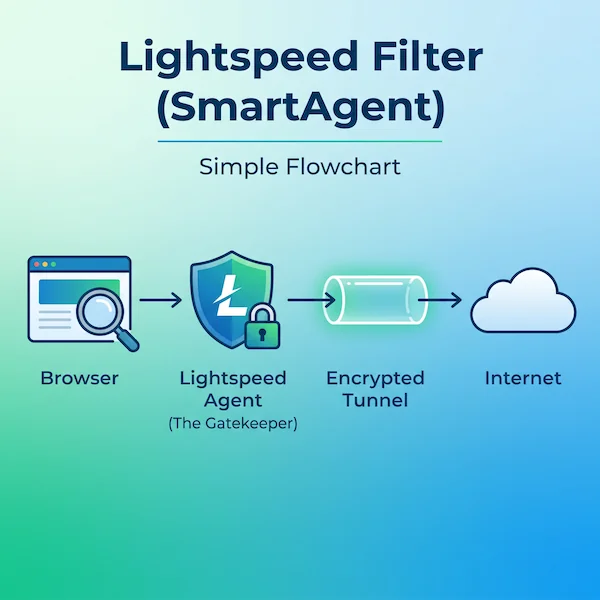
Lightspeed Filter (often called SmartAgent) is a per-device content filter built primarily for K-12 schools and a smaller number of regulated workplaces. It is paired with SmartShield, a DNS-based filter that covers BYOD and IoT traffic on the network. Knowing how each piece works is the difference between picking a method that works and one that gets you logged.
On macOS and iOS, the agent uses Apple's Network Extension API and the System Extensions framework. The macOS bundle identifier is com.lightspeedsystems.network-agent.network-extension, anchored to Lightspeed Systems' Apple developer team ID (ZAGTUU2342). On Chromebook, it ships as a force-installed Chrome extension pushed through Google Admin. On Windows, it runs as a kernel-level service that intercepts traffic before it reaches the network adapter.
Because filtering happens on the device after traffic is decrypted — the agent installs a trusted root certificate so it can inspect HTTPS — simple DNS changes, hosts file edits, and standard VPN connections are visible to it. Lightspeed's Signal product also flags suspicious traffic patterns (like sustained encrypted traffic to an unfamiliar IP) to admins for review. This is the key difference vs. older school filters: the agent is the gatekeeper, not just the network.
Method 1: Obfuscated VPN (The Most Reliable Way)
A standard VPN encrypts traffic between your device and a remote server. Lightspeed does not need to read the encrypted payload — it identifies VPN traffic by protocol fingerprint, port number, or known datacenter IP ranges, then blocks the connection or alerts the admin. An obfuscated (or "stealth") VPN solves the fingerprint problem by wrapping VPN traffic so it looks like normal HTTPS to TCP/443.
The features that actually matter on a Lightspeed-monitored device:
- Stealth or scramble protocol — OpenVPN Scramble (XOR), Shadowsocks, WireGuard-over-TLS, or a proprietary obfuscation mode like Proton Stealth or Astrill OpenWeb.
- Residential exit IPs — Lightspeed maintains an aggressive datacenter blocklist. A residential IP is treated as a normal home connection.
- Kill switch — drops the connection immediately if the VPN tunnel fails, so the agent never sees uncovered traffic.
- Verified no-logs policy — Panama, BVI, or Switzerland-based providers are typical.
For most people the cleanest choice is CometVPN, which combines obfuscated servers, a 32 million-IP residential pool, and one-click apps for Windows, macOS, iOS, and Android. Proton VPN's Stealth, Mullvad with Shadowsocks, and Astrill's OpenWeb are also tested choices. Avoid free VPNs entirely — their datacenter IPs are almost universally on Lightspeed's blocklist by 2026.
Method 2: Web-Based Proxies (The Quickest Way for Chromebooks)
For locked-down Chromebooks where you cannot install software, a web proxy is the fastest option. You visit a proxy URL, paste the destination URL, and the proxy fetches the page server-side and renders it inside its own domain — meaning the school filter only sees the proxy domain, not the destination.
Current 2026 favorites:
- CroxyProxy — best general-purpose; handles YouTube and most JS-heavy sites without breaking layouts.
- Interstellar — open-source, more than 8 million users since 2023, fast for streaming and browser games.
- Ultraviolet (UV) — service-worker-based; handles modern web apps better than legacy CGI proxies.
- Rammerhead — designed specifically to defeat Chromebook-class filters; multi-session support and sticky cookies.
The catch is short lifespan. Public proxy domains land on Lightspeed's URL blocklist within hours of going viral on TikTok or Reddit. Power users follow community-maintained "unblocked link" lists on GitHub, Discord, and Reddit and refresh them daily. If you find yourself doing this every other day, jump to method 5.
Method 3: Removing or Disabling the Lightspeed Filter Agent
This is the directly searched query "how to remove lightspeed filter agent." Whether it's even possible depends entirely on who owns the device.
School- or Work-Owned Devices
Enrollment is enforced through Google Admin (Chromebook), Active Directory or Intune (Windows), or Apple School/Business Manager plus an MDM (Mac/iOS). You cannot unenroll without admin credentials, and the policy is re-applied on every reboot. Killing the process in Task Manager (Windows) or Activity Monitor (macOS) only works for a few seconds — the watchdog respawns it, and repeated kill attempts are logged and reported. The community exploits like LightSPED-Killer-Agent for ChromeOS occasionally work, but they're patched within weeks of going public.
Personal Devices With Lightspeed Installed
This is rare but happens — for example, a parent-managed iPad. On Mac, the system extension has to be approved in System Settings → Privacy & Security → Profiles, and the configuration profile lives in System Settings → Profiles. On iPad and iPhone, check Settings → General → VPN & Device Management for the MDM payload. Removing those entries cleanly uninstalls Lightspeed if the profile was installed without supervision lock. If the device was supervised through Apple School Manager, the only legitimate path is to ask the IT admin to release it — third-party "MDM unlock" tools advertised online routinely brick devices.
Method 4: Browser-in-Browser Proxies (Rammerhead, Ultraviolet, DogeV4)
Rammerhead, Ultraviolet, and DogeV4 are an evolution of basic web proxies. Instead of just redirecting requests, they run a full proxy engine inside the browser tab using service workers. The tab you load looks like a single page on the proxy domain, but inside it you have a fully functional sub-browser with cookies, sessions, and tab history.
This matters because Lightspeed inspects URLs and DOM-level signals. A Rammerhead session keeps the destination URL hidden inside the encrypted service-worker layer — the filter only sees the outer proxy domain. Lightspeed's countermeasure is to blocklist the outer domain, so a Rammerhead instance that has been public for a week is almost certainly already blocked. The workaround is the same as for plain web proxies (rotate to a fresh mirror), or — much more reliably — host your own.
Method 5: Self-Hosted Ultraviolet on Replit or Railway (Pro Tip)
The most resilient option in 2026 is to run your own private Ultraviolet instance. Because the URL is private — only people you share it with know it exists — Lightspeed has no way to add it to a blocklist until somebody reports it. Setup takes about ten minutes:
- Fork the Ultraviolet-Node repo on GitHub.
- On Railway, click Deploy from GitHub, point to the fork, and click Deploy. SSL is automatic.
- Replit works similarly with a one-click template, but note that proxy hosting violates Replit's ToS — accounts are sometimes terminated, so Railway is the safer pick.
- Bookmark the personal
*.up.railway.appURL.
Pair this with a residential proxy backend if you want geo-targeting, faster speeds, or if your school filter blocks Railway's IP range entirely. MarsProxies and IPRoyal both expose HTTPS and SOCKS5 endpoints with sticky sessions of up to seven days, which slot in cleanly behind Ultraviolet.
VPN vs. Web Proxy vs. Self-Hosted Proxy: Which One Fits You?
All three solve different pieces of the Lightspeed problem. The table below is the shortest way to decide.
| Method | Best for | Survives blocklisting? | Setup difficulty |
|---|---|---|---|
| Obfuscated VPN | Personal device, full-system protection | Yes (residential exit) | Low (one-click app) |
| Public web proxy | Locked Chromebook, one-off use | No (hours to days) | None |
| Browser-in-browser (Rammerhead) | Chromebook, modern web apps | No (days to weeks) | None |
| Self-hosted Ultraviolet | Long-term Chromebook bypass | Yes (private URL) | Medium (10 min setup) |
| Residential proxy | Pro use, automation, multi-account | Yes (real ISP IPs) | Medium (browser config) |
Free Proxies vs. Paid Proxies for Lightspeed
Free public proxy lists are a poor fit for Lightspeed in 2026 for three reasons. First, they sit on the same handful of free hosting platforms (Render free tier, Vercel previews, Glitch) whose IP ranges Lightspeed flags aggressively — most fail at the first request. Second, they log every unencrypted request that passes through; several well-known free lists have been traced to operators harvesting login credentials. Third, they cycle out within hours, so a link that worked at lunch may be dead by the end of the school day.
Paid residential proxies cost a few dollars a month and avoid every one of those problems. The IPs come from real ISPs (Comcast, Verizon, BT, Deutsche Telekom), so blocking them would also block legitimate residential users — something Lightspeed will not do. For most readers, this is the difference between a bypass that works for an hour and one that works for the rest of the school year.
Is It Legal to Bypass Lightspeed Filter?
VPNs and proxies are themselves legal in almost every jurisdiction, including the entire EU, UK, and US. What matters is what you do with them and whose device you do it on.
On a personal device on a personal network, using a VPN or proxy to access a site Lightspeed has blocked is generally fine — the filter only applies to traffic you have voluntarily routed through it. On a school-issued device or while connected to a school or work network, almost every Acceptable Use Policy explicitly prohibits circumvention tools. Documented consequences range from a written warning, to losing device privileges, to formal disciplinary action. For minors specifically, K-12 filtering is required by US federal law (CIPA) and a growing set of state-level age-verification laws in 2026, so schools are not going to drop enforcement.
The methods in this guide are written for adults troubleshooting their own devices, IT pros testing their stack, and users who want to understand how the system works. They are not a license to access content that is illegal for the user's age or jurisdiction.
The Bottom Line: Our Recommended Setup for 2026
For a personal device, an obfuscated residential VPN is the simplest and most reliable solution. CometVPN is the cleanest one-click option — its obfuscated servers handle Lightspeed's protocol fingerprinting, and the Native Residential add-on at $1/GB gives you ISP-level IPs that aren't on any blocklist. Paid plans start at $1.89/mo on the two-year tier, with a 30-day money-back guarantee.
For Chromebooks where you cannot install anything, a self-hosted Ultraviolet instance on Railway is the most stable bypass. Pair it with MarsProxies residential proxies (starting at $3.49/GB with non-expiring traffic, sticky sessions up to 7 days, HTTP/HTTPS and SOCKS5) for a fully private setup that no public blocklist will ever catch up to.
For workplace and automation use cases, IPRoyal residential proxies with city-level targeting and sub-user management are a strong pick alongside any obfuscated VPN. Compare alternatives in our top 10 best residential proxy providers guide.
Whichever route you choose, remember the policy side: bypassing Lightspeed on a school-issued device is almost always against the AUP, and the agent itself logs activity that admins review. Use these tools where you have the right to use them.